

Every Lead. Every Source. Automatically Captured.
Stop manually entering leads from insurance portals, websites, phone calls, social media, and vendor platforms. BuilderFlow captures every lead automatically and starts follow-up instantly.
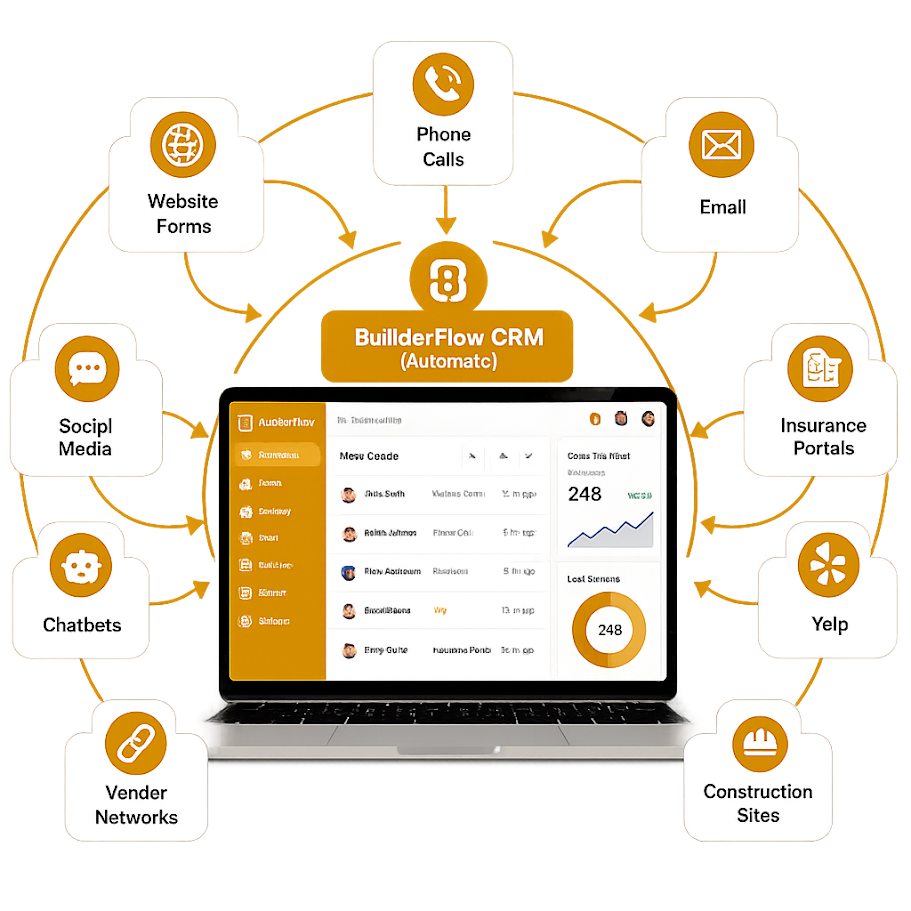
“From your website to insurance portals—BuilderFlow captures leads from EVERY source and creates them in your CRM automatically. No manual entry. No missed opportunities.”
Lead Sources We Connect
We Capture Leads from Everywhere Your Business Gets Them

Digital Marketing Channels
- Website Contact Forms - Instant CRM creation
- Phone Calls - Call tracking integration
- Social Media - Facebook
- Live Chat & Chatbots - Real-time conversation capture
- Email Inquiries - Intelligent email parsing
- Google My Business - Review platform leads
- SMS Text Messages - Two-way texting integration

Insurance & Vendor Portals
- Yelp Lead Integration - Request for quotes automated
- ITEL Laboratories - Restoration referral network
- Symbility Claims Connect - Insurance claim assignments
- XactAnalysis - Xactimate network + estimate import
- OpenDoor - Construction & remodeling leads

Industry-Specific Sources
- Construction Job Sites - Bid invitations
- Vendor Portals - Network referrals
- Insurance Platforms - Direct claim assignments
- Review Sites - Yelp, Angi, HomeAdvisor
All flowing automatically into ONE CRM. Zero manual work.
The Problem We Solve
Stop This Daily Struggle
- Logging into 10 different portals to check for leads
- Manually typing lead info into CRM (typos and errors)
- Missing leads because notifications were overlooked
- Delayed responses (competitors respond first)
- Scattered information across multiple platforms
- 2-3 hours daily wasted on data entry

Start This Instead
- Every lead automatically appears in your CRM within seconds
- Perfect data—no typos, no missing information
- Instant automated response to customers
- Immediate team notification and assignment
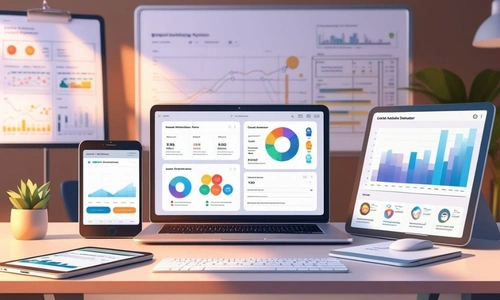
- All leads in one centralized dashboard
- Zero manual data entry
How It Works
Simple 3-Step Automation

Step 1: Lead Arrives (From Any Source)
Customer fills out your website form, calls your number, messages on Facebook, or claim is assigned in Symbility portal.

Step 2: BuilderFlow Captures Instantly
Our system detects the lead and captures all information automatically using the best method.
- API Integration - Direct connection
- Webhooks - Instant notifications
- Email Parsing - AI extracts data from emails
- AI Agents - Intelligent portal monitoring
- Call Tracking - Phone call details captured

Step 3: CRM Magic Happens Automatically
- Lead/Deal/Work Order created in CRM
- Assigned to right team member
- Instant notifications sent (SMS, email, app)
- Automated follow-up triggered
- Documents synced and organized
- Customer receives immediate response
You do nothing. It just works.
Featured Integrations

Yelp Lead Integration
Capture Yelp requests for quotes automatically
When customers message you on Yelp, BuilderFlow creates the lead in your CRM and triggers instant follow-up.
Information Captured
- Customer name, phone, email
- Service requested and project description
- Preferred contact method
- Geographic location
- Yelp message thread
Automatically Creates
- Lead in Zoho CRM
- Deal if project qualifies
- Triggers automated follow-up sequence
Integration Method: API integration with real-time sync.
Perfect For: Contractors with Yelp business profiles, service contractors (HVAC, plumbing, remodeling).

Symbility Claims Connect
Insurance claim assignments flow directly to CRM
Symbility is a leading property claims management platform used by insurance companies. BuilderFlow integrates to automatically receive claim assignments.
Information Captured
- Complete claim information and claim number
- Policyholder details and contact information
- Loss date and type (water, fire, wind, etc.)
- Property address and access instructions
- Insurance adjuster assignment
- Policy details and coverage
- Scope requirements and special instructions
- All claim documents and attachments
Automatically Creates
- Deal for insurance restoration project
- Claim Scope inspection work order
- Customer record with full claim details
- Document folders organized by claim number
- Initial follow-up tasks and timelines
Integration Method: Direct API connection with bidirectional updates.
Perfect For: Insurance restoration contractors, water mitigation specialists, contractors working with multiple insurance carriers.
Bonus Feature: Job status updates flow back to Symbility automatically.

XactAnalysis + Xactimate Import
Restoration network leads with automatic estimate import
XactAnalysis connects restoration contractors with insurance adjusters and property owners. BuilderFlow captures leads AND imports associated Xactimate estimates automatically.
Information Captured
- Project/claim details and scope
- Property owner and insurance information
- Xactimate estimate file (if available)
- Scope of work from adjuster
- Property location and damage type
- Timeline and urgency requirements
Automatically Creates
- Deal in CRM with complete claim context
- Imported estimate in Builder Estimate Pro (if Xactimate file available)
- Work order for initial assessment
- Document folder with all claim attachments
Integration Method: API connection + automatic Xactimate file download and import.
Perfect For: Restoration contractors using Xactimate, contractors seeking insurance work.
Game-Changing Feature: When Xactimate estimate is provided, it automatically imports into Builder Estimate Pro—eliminating hours of manual data entry.

ITEL
Restoration referral network integration
ITEL is a leading restoration referral network. BuilderFlow connects to automatically receive and process restoration job referrals.
Information Captured
- Claim details and loss type
- Property owner information
- Insurance company and adjuster details
- Scope of work requirements
- Urgency level and timeline
- Property location and access information
Automatically Creates
- Deal in CRM for qualified restoration jobs
- Work Order for emergency mitigation
- Project with claim documentation requirements
- Assigns to appropriate restoration team
Integration Method: API integration with webhook notifications.
Perfect For: Water damage restoration companies, fire and smoke damage specialists, restoration contractors in ITEL network.

OpenDoor & Construction Sites
Remodeling and construction project leads
OpenDoor and similar real estate/construction platforms generate leads for remodeling, renovation, and construction projects.
Information Captured
- Property owner information
- Project type and scope description
- Budget range and timeline requirements
- Property details and location
- Contact preferences
Automatically Creates
- Lead in CRM for qualification
- Deal if project meets criteria
- Initial follow-up task assignment
- Project folder in document management
Integration Method: API integration, email parsing automation, or AI-based data scraping.
Perfect For: Remodeling contractors, home improvement companies, general contractors, kitchen & bath specialists.
What Happens After Lead is Captured
Intelligent Automation Takes Over
Smart Record Creation
System automatically creates the appropriate record type.

Lead Created When
- First-time inquiry requiring qualification
- Information is incomplete
- Project timeline is uncertain
- Need to nurture before quoting

Deal Created When
- Insurance claim assignment (ready to bid)
- Qualified project with budget and timeline
- Repeat customer with new project
- Emergency mitigation work

Work Order Created When
- Emergency service call (water damage, fire)
- Existing customer requesting service
- Simple maintenance or repair request
- Inspection or assessment needed immediately
System Intelligence: AI analyzes lead source, urgency, and project type to automatically route to appropriate record type.
Instant Team Assignment
Intelligent Assignment Rules

By Territory
- Geographic assignment based on property location
- Respect existing territory boundaries
- Load balancing across reps

By Specialty
- Water damage → Water mitigation specialist
- Roofing → Roofing estimator
- Remodeling → Remodeling sales rep
- HVAC service → HVAC technician

By Availability
- Round-robin distribution
- Considers current workload
- Emergency leads to on-call rep

By Lead Source
- Yelp leads → Marketing specialist
- Insurance claims → Insurance department
- Vendor portal → Network coordinator

Custom Rules
- VIP customers → Senior rep
- High-value projects → Experienced estimator
- Specific insurance carriers → Certified adjusters
Multi-Channel Notifications

To Assigned Team Member
- SMS text alert (for urgent leads)
- Email with complete lead details
- Mobile app push notification
- Slack/Teams message (if integrated)

Notification Includes
- Customer contact information
- Project/claim details and urgency level
- Source platform
- Attachments and documents
- Quick action buttons (Call, Email, Text)
Automated Follow-Up Sequences

Immediate Actions (Within 1 minute)
- Auto-response email/SMS to customer: "We received your request and will contact you within 30 minutes"
- Lead assigned to rep
- First follow-up task created

30-Minute Follow-Up
- Task reminder to rep: "Call [Customer Name] about [Project Type]"
- If no action taken → Escalation notification to manager

24-Hour Sequence
- If no contact made → Automated email to customer
- Second SMS reminder
- Manager escalation

48-Hour Sequence
- If still no contact → Lead reassignment option
- Automated "Are you still interested?" email
- Final attempt notification

Custom Cadences by Lead Type
- Emergency Leads: Call within 5 minutes, on-site within 2 hours
- Insurance Claims: Contact within 24 hours, estimate within 48 hours
- Remodeling Inquiries: Follow-up within 4 hours, appointment within 3 days
Document & Attachment Sync

Automatically Synced
- Claim documents from insurance portals
- Xactimate estimates (automatic import to Builder Estimate Pro)
- Property photos from adjuster
- Assignment letters and policy information
- Inspection reports
- Customer-provided photos

Smart Organization
- Folder created automatically per lead/claim
- Documents categorized by type
- Naming convention: [ClaimNumber][DocumentType][Date]
- Searchable and accessible from mobile app

Integration with Builder Claim Scope
- Documents available during field inspection
- Technician can reference adjuster photos
- Complete claim context in mobile app
AI-Based Qualification & Categorization
Intelligent Lead Scoring

AI Analyzes
- Project type and complexity
- Budget indicators
- Timeline urgency
- Customer history (if repeat)
- Lead source quality
- Geographic profitability

Lead Score Calculated
- A+ (Hot) → Immediate attention, high probability
- A (Warm) → Standard follow-up, good potential
- B (Qualified) → Nurture campaign, medium potential
- C (Cold) → Long-term nurture, low immediate potential
Automatic Categorization

By Project Type
- Water damage restoration
- Fire damage restoration
- Mold remediation
- Roof repair/replacement
- Kitchen remodel
- Bathroom remodel
- Whole-home renovation
- Service/repair call

By Urgency
- Emergency (immediate response required)
- Urgent (24-hour response)
- Standard (48-hour response)
- Flexible (schedule at convenience)

By Value
- $$$ High-value (>$50K)
- $$ Medium-value ($10K-$50K)
- $ Standard-value (<$10K)
Communication History Tracking
Complete Activity Log

Automatically Tracked
- When lead was received
- Source platform and details
- Assignment history
- All emails sent/received
- SMS conversations
- Phone call logs
- Meeting notes
- Status changes
- Document uploads
- Follow-up completions

Benefits
- Never lose context when lead changes hands
- Manager visibility into follow-up quality
- Compliance documentation for insurance
- Customer history for repeat business
Integration Methods
We Use the Best Method for Each Source

API Integration
Direct System-to-System Connection
- How It Works
- Direct secure connection between BuilderFlow and lead source platform
- Real-time bidirectional data sync
- Most reliable and complete data transfer
- Advantages
- Instant lead capture (seconds)
- Complete data including attachments
- Two-way sync (status updates flow back)
- No manual intervention required
- Most secure method
Used For: Symbility Claims Connect, XactAnalysis, Yelp for Business, platforms with published APIs.

Email Parsing Automation
Intelligent Email Processing
- How It Works
- Lead notifications arrive via email to dedicated BuilderFlow email address
- AI-powered parser extracts structured data from email
- Lead created automatically in CRM with all details
- Advantages
- Works with any platform that sends email notifications
- No API access required
- Handles attachments (PDFs, photos)
- Processes forwarded emails
Used For: OpenDoor email notifications, insurance company email alerts, vendor portal notifications, manual lead forwarding.
Intelligence: Extracts customer name, phone, email, address, project type, urgency, claim numbers, and processes attached documents.

AI-Based Data Scraping Agents
Intelligent Portal Monitoring
- How It Works
- AI agent logs into vendor portal on schedule
- Intelligently navigates portal to find new leads
- Extracts structured data and downloads attachments
- Creates leads in CRM automatically
- Advantages
- Works when API is not available
- Captures data from any web portal
- Handles complex portal navigation
- Downloads attached documents
Used For: Legacy insurance portals without APIs, vendor networks with limited integration options, custom or proprietary platforms.
Security: Secure credential storage, encrypted connections, scheduled automation, activity logging for audit trail.

Call Tracking Integration
Phone Call Capture
- How It Works
- Dedicated tracking phone numbers for marketing campaigns
- Caller ID and call details captured automatically
- Call recording and transcription available
- Lead created in CRM with call information
- Advantages
- Know which marketing sources drive calls
- Automatic lead creation from phone calls
- Call recording for quality and training
- Track ROI on advertising
Used For: Website call buttons, Google Ads campaigns, traditional advertising, service call hotlines.

Webhook Notifications
Push-Based Instant Alerts
- How It Works
- Lead source platform sends an instant notification when a new lead arrives
- BuilderFlow receives the webhook and processes the lead immediately
- Real-time capture without constant polling
- Advantages
- Instant notification (under 1 second)
- Efficient (no constant checking required
- Reliable push-based system
- Lower server load
Used For: Modern platforms supporting webhooks, real-time critical applications, emergency mitigation leads.

Website Form Integration
Direct Website Connection
- How It Works
- Contact forms on your website connected directly to BuilderFlow
- Form submissions instantly create leads in CRM
- No third-party form tools needed
- Advantages
- Instant lead capture from website
- Form analytics and tracking
- Spam filtering built-in
- Mobile-optimized forms
Used For: Contact us forms, quote request forms, emergency service requests, consultation bookings.
Benefits of Automated Lead Integration
| Benefit | Before | After | Impact |
|---|---|---|---|
| Instant Response Time | Manually check portals throughout the day, delayed lead response | Leads appear in CRM within seconds, instant automated response to customer | Respond before competitors, higher win rate |
| Time Savings | 2-3 hours daily logging into portals and manually entering leads | Zero manual data entry, fully automated | 10-15 hours saved weekly per person |
| Complete Lead Visibility | Leads scattered across 10 different portals and email inboxes | All leads in one centralized CRM dashboard | Never miss a lead, complete pipeline visibility |
| Zero Data Entry Errors | Manual transcription errors (wrong phone numbers, addresses) | Perfect data transfer from source system | Fewer call-backs, faster job starts |
| Higher Conversion Rates | Slow follow-up, inconsistent processes | Immediate response, automated nurturing | 40-60% increase in lead-to-job conversion |
| Better Lead Distribution | Manual assignment, uneven workload | Intelligent routing by territory, specialty, availability | Fair distribution, faster response, better service |
| Complete Documentation | Attachments lost, documents not linked to jobs | All documents automatically organized by lead/claim | Better claim support, audit-ready documentation |
| Never Miss an Opportunity | Notifications overlooked, weekend leads ignored Multiple systems for CRM, estimating, scheduling, and invoicing | Instant alerts, 24/7 monitoring, escalation workflows | Capture every opportunity, even after-hours |
Implementation Process
How We Set Up Your Lead Integrations

Phase 1: Discovery
What We Do
- Identify all your lead sources and portals
- Document login credentials and access levels
- Determine best integration method per source
- Map data fields from source to CRM
What You Provide
- List of lead sources (insurance portals, vendor networks, website)
- Portal login credentials
- Desired lead routing rules
- Priority lead sources

Phase 2: Integration Development
What We Do
- Build API connections or automation scripts
- Set up email parsing rules
- Configure AI agents for portal scraping
- Connect website forms and call tracking
- Test data capture and CRM creation
What You See
- Test leads flowing into sandbox CRM
- Documentation of what data is captured
- Preview of automated workflows

Phase 3: Workflow Configuration
What We Do
- Configure assignment rules
- Set up notification preferences
- Build follow-up automation sequences
- Create document organization structure
- Set up AI qualification rules
Your Input
- Approve assignment logic
- Customize notification preferences
- Review follow-up sequences
- Define lead scoring criteria

Phase 4: Testing & Training
What We Do
- Conduct end-to-end testing with real leads
- Train team on new automated workflows
- Monitor first week of live leads
- Fine-tune based on feedback
Your Team
- Learns how leads appear in CRM
- Practices follow-up workflows
- Provides feedback for optimization

Phase 5: Go-Live & Monitoring
What We Do
- Switch from test to production
- Monitor integration stability
- Track lead capture success rate
- Provide ongoing support
- 24/7 monitoring and alerts
Timeline: Most integrations live within 2-4 weeks.
Get Started
Stop Missing Leads. Start Capturing Everything Automatically.
Ready to Automate Your Lead Capture?

Schedule Free Consultation
Tell us your lead sources (15-minute call)

Get Custom Proposal
We’ll recommend integrations and provide implementation plan

Go Live in 2-4 Weeks
We build, test, train, and launch
Call Now
Email Us
Frequently Asked Questions
What if my lead source isn't listed?
We can integrate with virtually any lead source using our multiple capture methods (API, email parsing, AI scraping). Contact us to discuss your specific source—we’ll find a solution.
Can you integrate with our website and social media?
Yes! We capture leads from
- Website contact forms
- Facebook and Instagram messages
- LinkedIn inquiries
- Live chat and chatbots
- Phone calls with call tracking
- Email inquiries
- SMS text messages
How reliable is AI-based scraping for portals?
Very reliable. Our AI agents run on schedule (every 15-30 minutes) and have >99% success rate. If a portal changes, we update the agent within 24-48 hours. We also have email backup to ensure no leads are lost.
Can leads flow to systems other than Zoho CRM?
Yes! We can send leads to:
- Salesforce
- Microsoft Dynamics
- HubSpot
- Custom CRMs
- Any system with an API
Zoho CRM integration is deepest, but we support others.
What happens if integration breaks?
We monitor all integrations 24/7. If an integration fails, we receive instant alerts and begin troubleshooting immediately. Email backup capture ensures no leads are lost during any downtime.
How many leads can the system handle?
Unlimited. Whether you receive 10 leads per month or 1,000 per day, the system scales automatically with no performance degradation.
How long does setup take?
Most integrations are live within 2-4 weeks from approval:
- Week 1: Discovery and planning
- Week 2-3: Integration development and testing
- Week 4: Training and go-live
Custom integrations and extensions designed to improve field communication, image management, and project collaboration.
Do you provide ongoing support for integrations?
Yes. All integrations include
- Ongoing maintenance and updates
- 24/7 monitoring
- Technical support
- No additional fees as part of BuilderFlow subscription
Can we prioritize certain lead sources?
Absolutely. You can set priority levels for different lead sources, ensuring emergency leads or high-value sources get immediate attention while others follow standard workflows.
What if we add new lead sources later?
No problem! We can add new integrations at any time. Most new source integrations can be completed within 1-2 weeks.
Trust & Security

500+
Contractors Using BuilderFlow Daily

99.9%
Lead Capture Success Rate

24/7
Integration Monitoring & Alerts

Enterprise-Grade Security
SOC 2 Certified

Bank-Level Encryption
AES-256, SSL/TLS

GDPR Compliant
Data Protection

Secure Credential Storage
For Portal Access
Every Lead Matters Don't Let Another One Slip Away.
BuilderFlow captures leads from your website, phone calls, social media, Yelp, insurance portals, vendor networks, and everywhere else—automatically.
- No manual work
- No missed opportunities
- Just more jobs
Stop Missing Leads. Start Capturing Everything Automatically.