
Run More Jobs With Less Office-to-Field Chaos
Contractor management software for Carrollton businesses that need better control over leads, estimates, crews, work orders, field updates, and job costs.
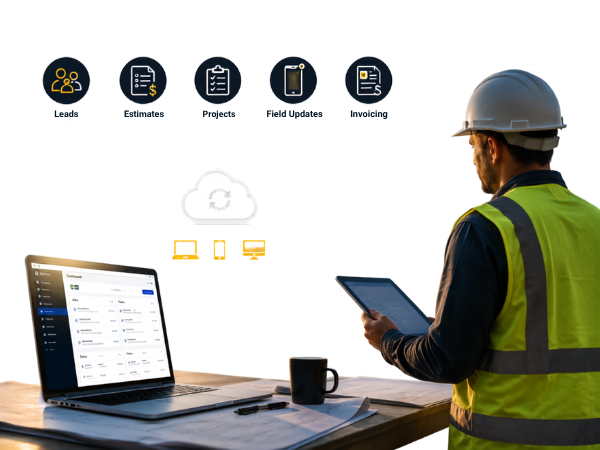
Your Jobs Are Moving. Your Systems Should Move With Them.
A new lead comes in. An estimate needs to go out. A customer wants an update. A crew needs job details. A project expense changes.
When those updates live in different apps, spreadsheets, texts, and emails, keeping everyone aligned becomes harder.
Builder Flow gives Carrollton contractors a connected workflow from the first customer enquiry through project completion and payment.
Designed Around Real Contractor Work
More visibility. Fewer handoffs. Less manual coordination.
Where Carrollton Contractors Can Lose Valuable Time

Leads Are Coming From Everywhere

Estimates Can't Wait
Customers expect quick answers. Spending hours rebuilding estimates or entering the same information into different systems can slow down approvals.

The Office Doesn't Always Know What Is Happening in the Field
When updates depend on phone calls and texts, project information can become outdated quickly.

Scheduling Gets Complicated as Crews Grow
Multiple technicians, job locations, skills, availability, and changing schedules make manual coordination difficult.

Project Profitability Can Be Hard to See
Knowing what a project is worth is not the same as knowing what it is actually costing you.
Builder Flow connects these moving pieces so your team can make decisions with better information.
From New Lead to Final Payment
Builder Flow connects the major stages of your contractor workflow:
Instead of rebuilding information at every stage, your team can continue working from the same project information.
Handle Restoration Documentation Without the Paper Chase
Builder Claim Scope
Document water, fire, mold, mitigation, and storm-related projects with structured inspections, measurements, photos, damage details, and field reports.
North Texas weather can create sudden restoration demand, making organized field documentation especially important for contractors handling storm and property-damage work.

Know What Each Project Is Really Costing You

Builder Finance
Track bills, expenses, project costs, invoices, budgets, and profitability while the project is underway—not weeks after the work is completed.
Contractor Software Built Around the Work You Actually Do

Capture More Opportunities
CRM & Lead Management
Keep enquiries, customer information, follow-ups, communications, and opportunities organized. Give your team a clear view of what needs attention and what comes next.
Best for:
Contractors who want better lead response and sales visibility.

Turn Estimates Around Faster
Builder Estimate Pro
Create professional estimates using templates and pricing tools, and import Xactimate files for restoration projects. Move approved estimates into the next stage without unnecessary re-entry.
Best for:
General contractors, remodelers, restoration companies, and specialty contractors.

Keep Every Work Order Accountable
Work Order Management
Create, assign, update, and monitor work orders while keeping customer and project information connected from start to finish.

Schedule Crews With More Control
Builder FSM
Plan technician and crew schedules around availability, skills, location, and workload. Give your office a clearer view of what is happening today and what is coming next.

Give Your Field Team the Information They Need
Technician Mobile App
Your technicians can access schedules, work orders, customer information, photos, GPS details, notes, time tracking, and digital signatures from the job site.
Keep Every Work Order Accountable
Work Order Management
Create, assign, update, and monitor work orders while keeping customer and project information connected from start to finish.
Perfect For:
Contractors who lose leads due to slow response or poor organization
CRM & Lead Management
Never Lose Another Lead
Capture leads from websites, phone calls, social media, Yelp, insurance portals, and vendor networks automatically. Builder Flow qualifies leads, assigns them to the right team member, and triggers instant follow-up.
Perfect For:
Contractors who lose leads due to slow response or poor organization
CRM & Lead Management
Never Lose Another Lead
Capture leads from websites, phone calls, social media, Yelp, insurance portals, and vendor networks automatically. Builder Flow qualifies leads, assigns them to the right team member, and triggers instant follow-up.
Perfect For:
Contractors who lose leads due to slow response or poor organization
Handle Restoration Documentation Without the Paper Chase
Builder Claim Scope

Know What Each Project Is Really Costing You

Builder Finance
Track bills, expenses, project costs, invoices, budgets, and profitability while the project is underway—not weeks after the work is completed.
One Connected Workflow Instead of Multiple Systems
Imagine this:
A homeowner contacts your company about a remodeling project.
Your team captures the enquiry, follows up, prepares an estimate, and gets approval. The project becomes a work order. The appropriate crew is scheduled. Your technician receives the job details on their phone and sends photos and updates from the site.
As the project progresses, your office can monitor activity, documentation, expenses, invoices, and profitability.
The goal isn’t simply to give you another software tool. It’s to reduce the gaps between the tools and people you already rely on.


Carrollton contractors rarely work only within Carrollton.
A remodeling company may have a project in Carrollton today and a customer in Farmers Branch, Coppell, Lewisville, or Addison tomorrow. Restoration and service contractors may also need to coordinate technicians across multiple DFW job locations.
Builder Flow keeps the customer, estimate, work order, schedule, field updates, and project costs connected as crews move between jobs.
Contractor Challenges Across Carrollton & North Texas
Carrollton contractors often manage multiple crews, projects, and job locations across the DFW area. As the business grows, keeping everything connected can become difficult.

Managing Multiple Job Locations
Crews may work across Carrollton, Farmers Branch, Addison, Lewisville, Coppell, Plano, and nearby DFW communities, making scheduling and job visibility more challenging.
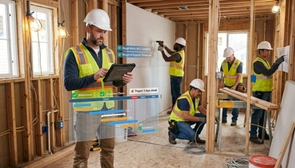
Coordinating Office & Field Teams
Keeping technicians updated on schedules, work orders, customer information, photos, and job-site changes can be difficult when information is spread across calls, texts, and separate systems.

Managing Multiple Projects
Remodeling and home-service contractors may have leads, estimates, active jobs, and completed work happening at the same time. A connected workflow helps keep every project moving.

Responding to Restoration Jobs
Storm, water, fire, and mold-related work often requires fast documentation, photos, measurements, estimating, and field coordination.

Tracking Job Costs
Material, labor, subcontractor, and other project costs can change throughout a job. Contractors need visibility into costs and profitability while the project is underway.
Builder Flow connects leads, estimates, work orders, scheduling, field operations, documentation, and job costs in one contractor-focused workflow.
Why Choose Builder Flow Over Another Generic CRM?
Most business CRMs are built around contacts, deals, and sales pipelines.
Contractors need more.
They need to connect the lead with the estimate, the estimate with the work order, the work order with the crew,
the field activity with the project, and the project with its financial results.
Builder Flow brings those contractor-specific processes together.
| What Your Team Needs | Builder Flow |
|---|---|
| Lead management | Contractor-focused CRM workflow |
| Estimating | Builder Estimate Pro + Xactimate import |
| Work orders | Connected project workflow |
| Scheduling | Field service management |
| Field execution | Technician mobile app |
| Restoration documentation | Builder Claim Scope |
| Job costs | Builder Finance |
| Business systems | Zoho ecosystem integration |
You don't need to replace every system overnight. Start with the part of your workflow causing the most friction and build from there.
Built for Different Types of Contractor Businesses

Remodeling & Renovation
Manage enquiries, estimates, customer communication, crews, and project progress.

Roofing
Keep leads, estimates, scheduling, field documentation, and project costs connected.

Restoration & Mitigation
Move from damage assessment and documentation to estimating, scheduling, execution, and billing with less manual coordination.

HVAC, Plumbing & Electrical
Manage service enquiries, work orders, technician schedules, mobile updates, and customer information.
General & Commercial Contractors
Maintain visibility across multiple projects, teams, work orders, costs, and customer relationships.
Why Carrollton Contractors Can Benefit From a Connected Workflow

Respond Faster
Know which leads need attention and keep follow-ups from getting lost.

Estimate With Less Rework
Reduce duplicate entry and move approved estimates into the next stage.

Keep Office and Field Teams Aligned
Give everyone access to the project information they need.

Make Scheduling More Predictable
See availability and workload before assigning the next job.

Understand Project Performance Earlier
Monitor costs and profitability while there is still time to act.
Frequently Asked Questions
What is the best contractor management software for Carrollton contractors?
The right contractor software should connect the processes you use every day—from lead management and estimating to work orders, scheduling, field operations, and job costing. Builder Flow brings these workflows together in one connected platform.
Does contractor software work for remodeling companies in Carrollton?
Yes. Builder Flow supports remodeling workflows including lead management, estimating, work orders, scheduling, customer communication, field coordination, and project cost tracking.
Does Builder Flow support restoration contractors in Carrollton?
Yes. Builder Flow supports restoration workflows involving water, fire, mold, and storm-related projects. Builder Claim Scope helps teams organize inspections, measurements, photos, damage details, and field documentation, while Xactimate file import helps streamline estimating.
Can Carrollton contractors manage crews working across DFW?
Yes. Builder FSM helps contractors coordinate technicians and crews based on availability, skills, workload, and job location across Carrollton and surrounding DFW communities.
Does Builder Flow connect CRM, estimating, and field service?
Yes. Builder Flow connects leads and customer information with estimates, work orders, scheduling, field activity, documentation, and financial workflows, reducing duplicate data entry and disconnected processes.
Can contractors track job costs and profitability?
Yes. Builder Finance helps contractors track bills, expenses, project costs, invoices, budgets, and profitability while projects are still underway.
Can small contractors use Builder Flow?
Yes. Builder Flow can support smaller contractors as well as growing teams. Businesses can start with the workflows they need most and expand as their operations grow.
Can I see how Builder Flow would work for my contracting business?
Absolutely. Schedule a personalized demo to review your current workflow and see which Builder Flow solutions fit your business.
Don't Just Add Another Tool. Improve the Way Your Team Works.
Your business may already have software.
The question is whether your leads, estimates, projects, crews, field updates, and finances are actually connected.